PostgreSQL update and locking tip
Start a PostgreSQL server using docker:
docker run --rm --name some-postgres -e POSTGRES_PASSWORD=mysecretpassword postgres
open one terminal (A):
docker exec -it some-postgres psql -U postgres
and create a table and insert one row
CREATE table accounts(
    id TEXT PRIMARY KEY,
    name TEXT NOT NULL
);
INSERT INTO accounts(id, name)
VALUES
('9e6f35d3-f53a-423f-a0d6-d60c441e3b40', 'Georgios');
Now try:
BEGIN;
UPDATE accounts SET name = 'Georgios' WHERE id = '9e6f35d3-f53a-423f-a0d6-d60c441e3b40';
We haven't committed yet
Keep terminal A open.
Now keep in another terminal B:
No transaction below
UPDATE accounts SET name = 'Georgios' WHERE id = '9e6f35d3-f53a-423f-a0d6-d60c441e3b40';
The SQL statement in terminal B does not complete
What is going on:
open another terminal and run:
select * from pg_stat_activity where query ilike '%update accounts%' and query not like '%pg_stat_activity%' \gx
You should get some similar like the image
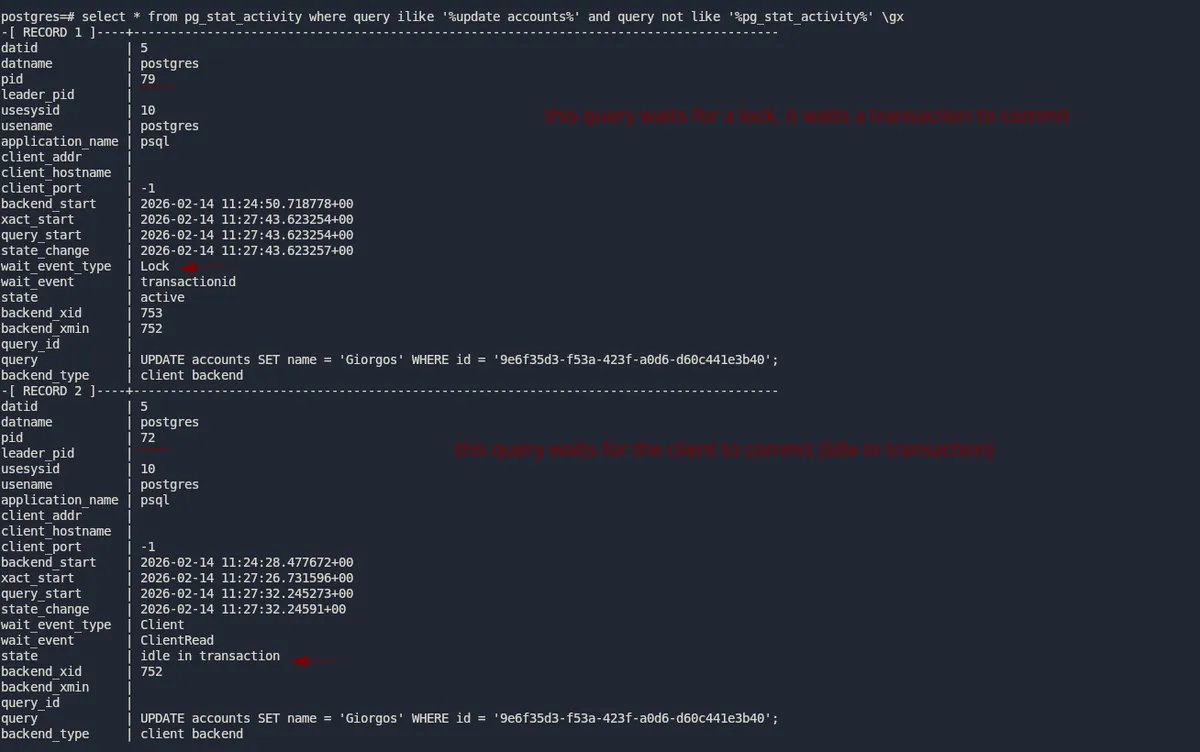
Let's verify that with another query:
SELECT
  pid,
  pg_blocking_pids(pid) AS blocked_by,
  query
FROM pg_stat_activity
WHERE cardinality(pg_blocking_pids(pid)) > 0;
and I got:
-[ RECORD 1 ]---------------------------------------------------------------------------------------
pid        | 79
blocked_by | {72}
query      | UPDATE accounts SET name = 'Giorgos' WHERE id = '9e6f35d3-f53a-423f-a0d6-d60c441e3b40';
Above we can see that the pid 79 is blocked by pid 72.
Now go in the first terminal and commit. Once you commit both queries will finish.
In a high concurrency environment it might be that you have updates updating the same value as was previously set. Sometimes you have in the application layer:
name = select name from accounts where id = <any-id>
if name != 'Georgios' {
    update accounts set name = 'Georgios' where id =<any-id>
}
This might seems ok however in high concurrency it can lead to database locks and can affect database performance.
In such case you can do like that:
name = select name from accounts where id = <any-id>
if name != 'Georgios' {
    update accounts set name = 'Georgios' where id =<any-id> and name != 'Georgios'
}
Try the same experiment as above.
In terminal A do:
BEGIN;
UPDATE accounts SET name = 'Georgios' WHERE id = '9e6f35d3-f53a-423f-a0d6-d60c441e3b40' AND name != 'Georgios';
(not commit)
Notice that now the above returns UPDATE 0 instead of UPDATE 1
and in terminal B do:
UPDATE accounts SET name = 'Georgios' WHERE id = '9e6f35d3-f53a-423f-a0d6-d60c441e3b40' AND name != 'Georgios';
PostgreSQL is smart enough that it does not acquire a lock when the name values are the same. This small trick helps a lot in cases where multiple clients are trying to update the same row. In fact using that pattern one can eliminate the SELECT in the application code.